Filters
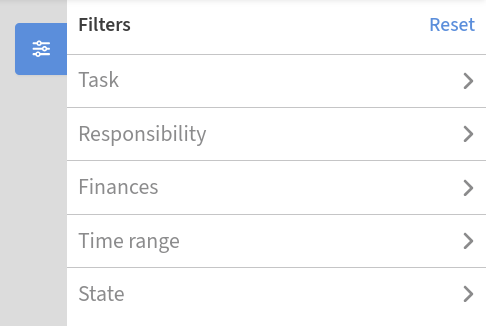
The filter component is a powerful yet easy-to-use tool available on the Analysis and Statistic pages. It helps narrow down the data to focus on what matters most and cad adapt to your role within company, ensuring you see the most relevant information for your responsibilities.
Task
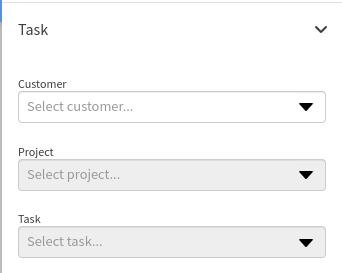
Filter results by Customer, Project or Task to focus on specific areas of work. This makes it easy to analyze data for a particular client, project or task in detail.
Responsibility
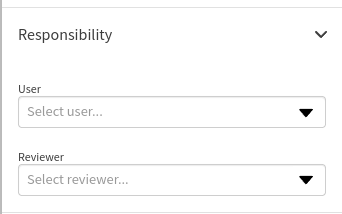
Use this filter to view data based on User or Reviewer. The User is the creator of the report, while the Reviewer is the person responsible for verifying and approving it.
Finance
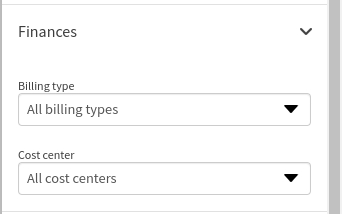
The finance filter offers options to refine data by Billing Type and Cost Center.
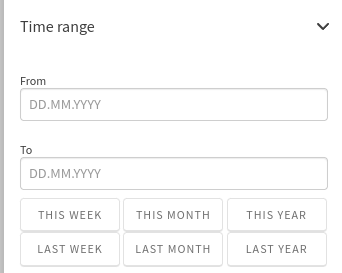
Time Range
Restrict data to a specific time frame by setting a custom date range. Whether analyzing a single week, month or broader period, this filter ensures your results are targeted and relevant.
State
The state filter allows you to refine your query based on the current status of reports. Each status highlights a specific stage in the report's lifecycle, making it easier to manage and track progress.
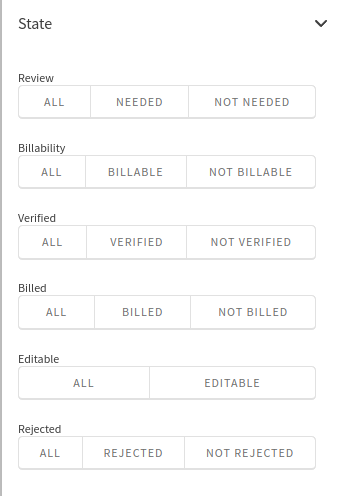
Review
Indicates reprots pending supervisor review.
Billability
Highlights tasks marked as billable or non-billable.
Verified
Displays reports that have been reviewed and approved.
Billed
Shows reports that have been invoiced.
Editable
Lists reports you're able to edit.
Rejected
Filters out reports that have been rejected.